
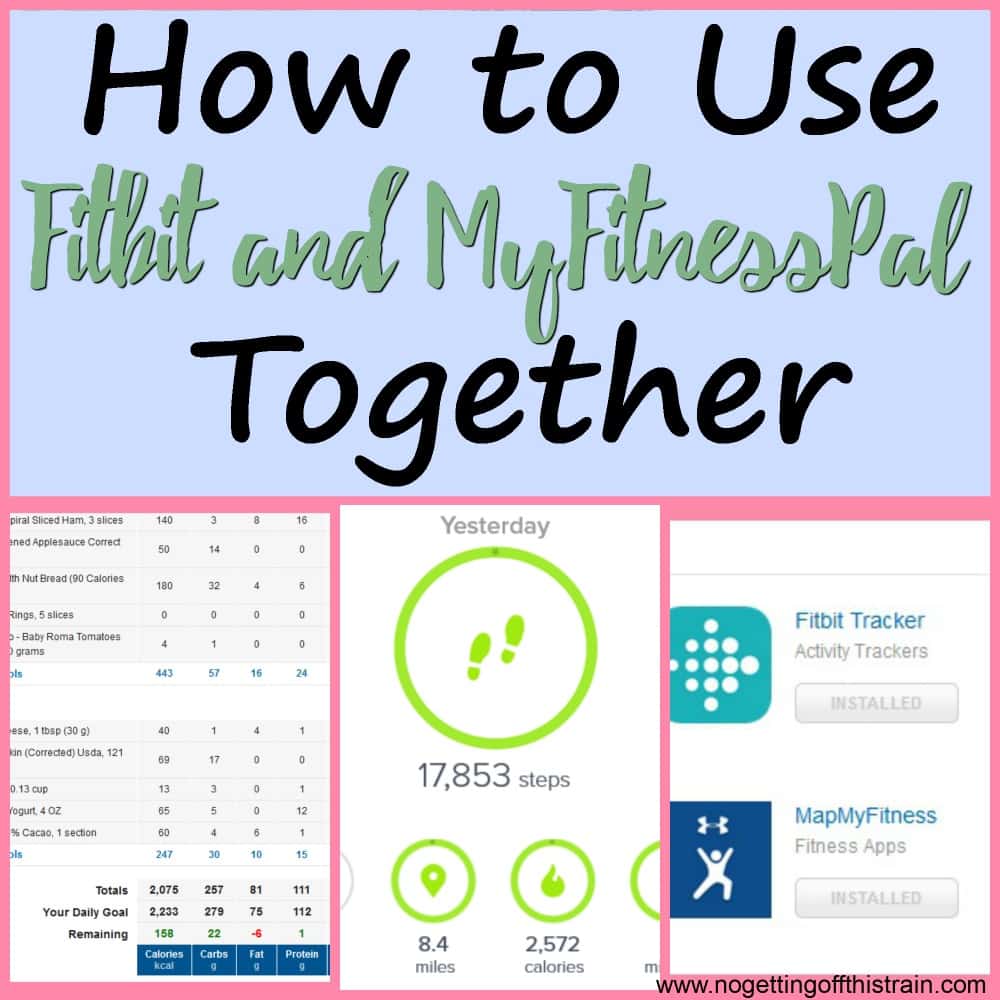
Are you trying to lose weight or get healthier this year? Fitbit and MyFitnessPal work together to maximize your results! Here's how to sync them together.
Have you made New Years resolutions to get healthier like many others in the world?
Maybe you want to lose weight, or even just maintain your weight. Or maybe you want to start exercising more.
Did you know there are two powerful tools you can use to ramp up your progress? They're simple apps that, when linked together, can help you lose weight and get healthier.
[mailerlite_form form_id=21]Those apps are Fitbit and MyFitnessPal, and I swear by them whenever someone is interested in getting healthier. They both work together to change your mindset of healthy living and give you steps toward a better life.
I'll show you how to use Fitbit and MyFitnessPal together to get the most out of these apps!

Why use Fitbit and MyFitnessPal together?
If you're serious about weight loss, using these two apps is one of the best ways to stay motivated and see your progress.
I first started using both in May 2015, when I had about 20 pounds of baby weight to lose. Using both these apps, I was able to lose all 20 pounds by January 2016 and then some!
It really works, as long as you have the diligence to keep up with it every day.
Create both accounts, then link them together
If you don't have accounts yet for either Fitbit or MyFitnessPal, here are the pages to create an account. Do this first:
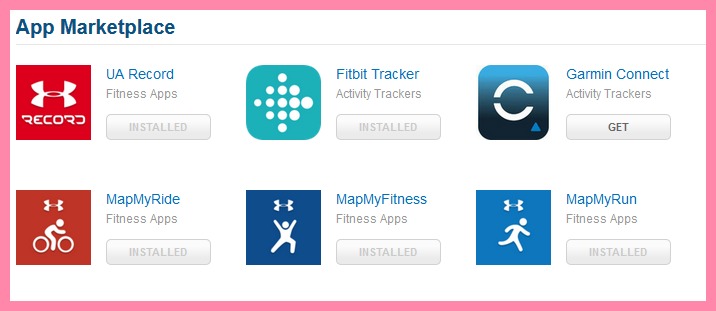
Next, hop over to MyFitnessPal and click on "Apps" on the top menu bar. It'll take you to a list of different apps and accessories.
Scroll down to "Fitbit Tracker" and click "Get". You'll then need to log in to your Fitbit account to confirm the sync, and that's it!
Now MyFitnessPal will grab your Fitbit's data and give you more exercise calories if you've worked out hard that day (More on exercise calories below).
Enter your food in MyFitnessPal
This is the part where a lot of people just give up. Logging your food, every single meal and bite, seems daunting and just way too hard. I totally get it!
To be transparent, I gave up after about 2 months of logging and stopped caring for another 2 months or so. Then when the weight came back on, I realized I had to get serious about this.
Entering your food isn't too hard. If you have the app, you can actually scan the barcode of whatever you're eating and it'll automatically be put into your food log.
For recipes, you can either guess (Which could be way off), or use the Recipe Builder which I do all the time. You just enter the ingredients, how many servings you want out of it, and the app will calculate the number of calories per serving.
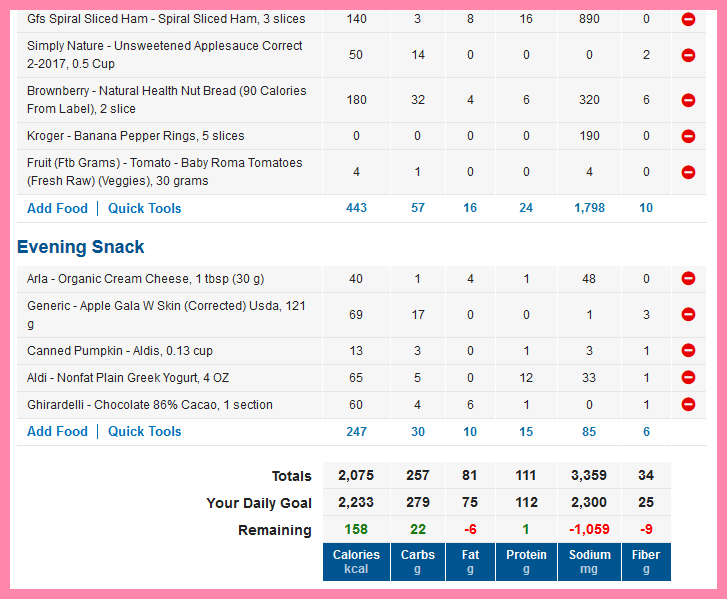
Once you enter your food for the day, you'll see at the bottom where you stand calorie-wise. Do your best to stay within your calorie range and don't be too over or under!
Is Fitbit or MyFitnessPal better for tracking food?
Honestly, I never bothered tracking my food on the Fitbit app.
The reason is because you can't create your own recipes.
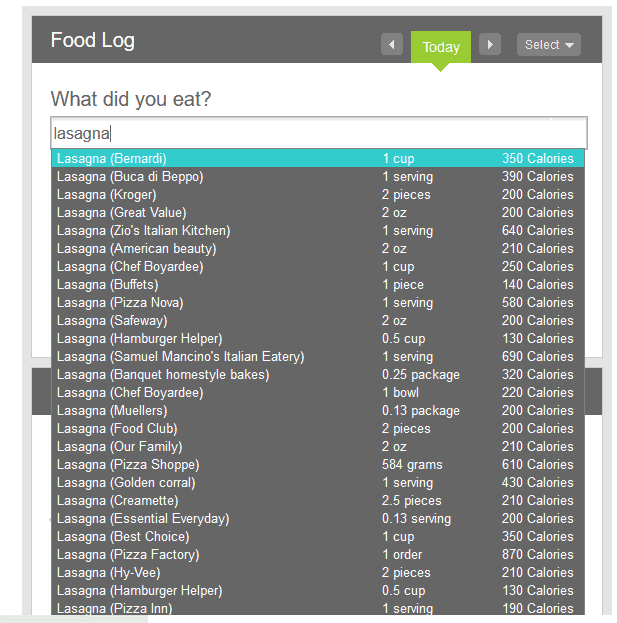
Take a look at the picture above. When I typed in "Lasagna", look how many entries came up.
The calories range from 130 all the way to 870! If you were to make your own and use Fitbit to log your food, you wouldn't know which to choose.
You could easily have eaten 870 calories but only logged it as 130. Do this every day, and you'll end up gaining weight if that's not your goal.
That's why I swear by MyFitnessPal's recipe creator. Take less than 5 minutes to enter in your recipe; I promise you, you're going to thank yourself later.

Exercise using your Fitbit
Whether you walk, run, or do any other form of exercise, your Fitbit will track your workouts. Some Fitbits are better than others; those with the heart rate monitor, like my Fitbit Blaze, will give you a more accurate calorie burn.
But if you have one without a heart rate monitor, like the Flex 2 which is much cheaper, the counted steps work just as well. The important thing is that you move!
Decide on a daily step goal and stick to it every day. I use the standard 10,000 steps which works well; I'm usually way over on running days, and I just barely make it on most non-running days.

Use up your exercise calories
When your Fitbit syncs with MyFitnessPal, you may see some extra calories at the bottom of your screen after you've done some exercise. The amount depends on how much exercise you did and the activity level you've set yourself at. These exercise calories are good and are meant to be eaten.
When you sign up for MyFitnessPal, you set your height, weight, activity level, and how much weight per week you want to lose, and the app will give you a calorie amount.
Eating that every day should get you to your weight loss goal, provided you track accurately. Eating those exercise calories will still make you lose weight because your daily calorie allotment does not include exercise.
Meaning, if you go for a run that day, you're entitled to eat a little more because you need that energy to fuel your workout!
The calories don't match for Fitbit and MyFitnessPal. What's wrong?
You may find that if you burn 300 calories during a Fitbit workout, not all 300 will show up as calories burned in MyFitnessPal.
This is normal and it's supposed to do this. You can read all the details in MyFitnessPal's Q&A, but basically- Fitbit tracks your activity all day long. It'll adjust your calories based on how active you've been.
For example: You burn 300 calories in a workout but then sit on the couch for 7 hours afterward. If you usually spend those 7 hours up and about, then Fitbit will realize you're not as active as you usually are. And it won't give you all 300 calories burned, but maybe just a percentage.
It may be hard to understand, but it's all part of NEAT- Non-Exercise Activity Thermogenesis. Those are all the calories you burn doing your daily activities- walking to your car, cooking, washing dishes, etc.
Those all burn calories; and if you sit on the couch for 7 hour like above, you're not burning those usual calories.
Got it?
Now that you know how to use these two powerful tools, don't let yourself slip away! Make friends on both apps. Join Fitbit challenges; read the forums on MyFitnessPal for inspiration; and most importantly, don't give up!
I'm active on both apps, so feel free to add me:
Have you used either of these tools, or anything else, to help in your weight loss? Share your success stories below in the comments!

Jaime is a Nutrition Coach through the ISSA and professional writer. She has 4 years experience coaching and 9 years experience in writing. She enjoys cooking easy meals, running, and learning more about food.
Jaime specializes in helping women with ADHD learn to meal plan and cook healthier meals without getting overwhelmed.





I can't get my workouts synced on MyFitnessPal. No matter how many times I revoke and relink them, the weights/workouts/runs recorded on my Charge 2 won't show up on MFP. On the other hand, calories, weight and water will sync.
That's really weird! Sometimes Fitbit does mess up like that. =( I'm not sure how to fix it besides contacting Fitbit.
I can’t get the Fitbit app to pick up exercise from MFP. It used to and stopped. Anyone else?
Hi Marco, have you tried disconnecting and then re-connecting the apps? =) Sometimes that helps me. Otherwise, contacting support may help you.
I see the steps FitBit has synced over to MyFitnessPal but I don't see my food diary on the FitBit app anywhere, is it only visible on the MFP app? I just got my FitBit yesterday and this is all brand new to me.
Hi Irene! If you look on your Fitbit app's dashboard, you should see an icon that looks like a fork and knife. That's your food diary for Fitbit. If you enter your food into MyFitnessPal, the calorie amounts should transfer to Fitbit. To be honest, I only use MyFitnessPal to track the food and don't worry about that part for Fitbit! I think MFP is easier to track food, anyway. =)
Have you solved this by any chance? I cannot get my workouts like weights and elliptical etc to show up on mfp. I see my steps but that's it. Is it supposed to ?
I have been using the MFP app, and have the Endomondo app connected to MFP. I was recently given a Charge 3 Fitbit and have that connected to MFP. I tracked a walk using the Fitbit app on my phone, not my device, and the exercise was linked to MFP without a problem. Today I tracked a walk using only my device and although the walk shows in my exercise with 330 calories burned, the food icon does not show the additional calories earned and the exercise was not correctly linked to MFP. MFP showed 61 calories burned. I did sync my tracker with the Fitbit app to save my workout. I'm assuming you don't use both the device and app at the same time to track an exercise. Which is better to use? I only log my food in MFP. Also, what constitutes the calories burned? I burned 330 on my walk today and my summary says +330 of 1,565 calories burned. I only log my food in MFP. Any hints/help you can give me would be appreciated. I've read parts of the manual and have visited different sites to get information, but am still having trouble figuring out the best way to go. Thank you
Hi Mary Lou! I use only my Fitbit to track any exercise. And even though it'll say I've burned let's say 200 calories, MFP will tell me I've burned less. I believe the number we see on the MFP app are exercise calories, which means that's what you're allowed to eat back. So even if you burned 330 calories according to Fitbit, MFP will give you less exercise calories to eat back.
It all evens out in the end, as long as you stay within your calories on MFP. It doesn't make total sense to me, but the numbers work and I've been able to maintain my weight for almost 3 years using MFP. I hope that makes sense and helps to answer your question. =)
Hi! Great post! On MFB under exersice I only see fit bit tracker adjustment which seems to only be calculating my steps, how can I tell if it is syncing my calories burned from my Fitbit exercises? For example right now my fit bit is showing 976 total calories burned but MFP only has the steps count as calories burned, so I have to manually enter in the total calories burned per exercise according to my fitbit record?
Hi Nancy! It sounds like your Fitbit is working the way it should. MFP gives you a certain amount of exercise calories when it syncs with Fitbit, but it won't be the same number as Fitbit shows. The 976 total calories you mentioned sounds like that's how much you've burned all day, not just from a single workout session, right? MFP won't give you 976 exercise calories because part of that is just what you normally burn during day-to-day life.
I don't know all the specifics, but I suggest using what MFP is giving you as exercise calories. If you gain weight or stall in your weight loss, you can choose not to eat back all the exercise calories MFP gives. I hope all of that makes sense!
I also have a Fitbit charge logging steps (10000 goal) but I also track a bike warm up & cool down & eliptical work everyday. My fitness pal is where I track food. ( it’s easier and more complete I think). Anyway, so I’ll see a Fitbit sync on MFP of let’s say 600 calories or whatever. The bike on fitness pal is 80 and the elliptical is 400. Should I be adding in to MFP the 480 calories from the additional exercise or not?
Hi Lisa! I would leave MFP just like it is. Fitbit's exercise calories doesn't exactly give you the same amount as what you see on MFP. But I've been maintaining my weight using MFP for 3 years now, so I think it's pretty accurate! If you're concerned about the number, though, I know that people eat back only half of their exercise calories. You can try that to see how it helps your weight loss. If it's too big of a weight loss, just eat back all of your exercise calories. =)
Hello!
I'm trying to figure out what my activity level is for MFP. I've got an Alta HR, which is linked to MFP, and that auto tracks most of my exercise. My activity level is set as Lightly Active in MFP currently, but it seems like I'm being given waaaay too many exercise cals in MFP whenever they sync.
As an example, this past Tuesday (1/29) I ate over 2k calories and hit over 17k steps (which includes (4700 from an elliptical workout I did.) I didn't log that in MFP, and I was given over 1k exercise cals. That seems way too high.
All of my settings are the same on both except for calorie goal. I have Fitbit set on Personalized since I'm doing calorie cycling and I plan on eating back at least SOME of my exercise calories so I'm not netting <1k cals/day. (Now if Fitbit gave the option of setting calorie goals for specific days this wouldn't be too much of an issue.)
Thoughts?
Hi Danielle! How many steps do you average per day? If you consistently hit 17k steps a day, then 1,000 exercise calories may be right depending on your weight and how hard you worked.
I'm also set to Lightly Active (I stay at home with my daughter but work out in the mornings and get 10k steps daily). I've found that the exercise calories MFP gives me every day (between 300-450) works pretty well!
If you think your exercise calories are too high, try setting your activity level to Active and give it a week. See if you go up or down in weight, and you may just have to adjust from there. =)
I've averaged between 11k-12k steps a day, although since I'm upping my exercise to include weights and HIIT I've been closer to 14-15k. Just last night I set it to active but set Fitbit Food Plan to Sedentary so I'm not overdoing it on cals. I had it set to Personalized for months but I was always several hundred calories under on the Dashboard.
I cant get my steps sync over to myfitness pal ive tried meverything please help
Hi April! You might need to contact Fitbit support for that because I'm not good at troubleshooting. =) Here's the link to get the help you need: https://help.fitbit.com/?l=en_US&cu=1&fs=ContactUs
Just stating out. Should I log my exercise into MFP while wearing my fit bit? Or is that double dipping?
I don't want to inaccurately measure my fitness (I have yet to eat my exercise calories) but would like to have an accurate measurement.
That would be double dipping. =) As long as you have your Fitbit synced with MFP, your exercise will be logged automatically!
I’m really struggling with this. Want to lose weight so calorie set for 1700 a day on mfp. Then due to exercise and active work gain more calories. Sometimes I have in excess of 2500 but never have that many but haven’t lost any weight. What/where am I going wrong??
Hi Joanne! How long have you been tracking on MFP? When I started losing weight, it took a few weeks to get a consistent weight loss. And even then, it wasn't linear.
There are a couple things that could be happening:
1. You haven't been at it long enough to see a change. I weigh myself weekly and not daily because weight fluctuates so much. Give it at least a month and see what changes.
2. You're underestimating what you eat. Do you have a food scale and weigh your food? Do you track really carefully? You could unknowingly be going over your calories by not tracking properly.
Those were some of the problems I had when I was losing weight. I'm not an expert, but I hope that helped a little. =)
I have a fitbit scale, should MFP pull the weigh ins from fitbit too? I can't seem to make it work.
That's a good question! It might, but I don't have a Fitbit scale so I don't know for sure. =( Sorry! Maybe this thread will help: https://community.fitbit.com/t5/Third-Party-Integrations/Does-MFP-still-support-Fitbit-Aria-Scales/td-p/2093702
Hi my fitbit charge 3 and MFP are linked. As exercise I walk a minimum of 60 minutes per day. My fitbit will show the steps for this exercise as well as calories burned Do I log the walk as an exercise on MFP as well? Because the difference when I do shows a substantial difference in calories burned and therefore I am not sure if I am doubling up?
Hi Annette! As long as MFP is showing that you did exercise on your Fitbit, I wouldn't change the calories. I don't know the exact formula, but it does adjust itself. Stick with MFP's calories for a couple weeks; and if you're not losing weight or losing too much, you can adjust to your liking. =) I hope that helps!
Hello,
I track my workouts on Fitbit app and have let's say 700 kcal burned FROM WORKOUTS ALONE that day on Fitbit. This is not counting in calories to "stay alive", just tracking an actual workout. (I am set to have sedentary style so my basic calorie burn shouldn't differ because of that.)
However, my MFP adjustment will show a different number. I read somewhere that you have to wait until the end of the day for the numbers to match exactly, but that does not happen. MFP is consistently showing me LESS burned calories. If anything, I would expect MFP to show me more burned calories than what I track in Fitbit with workouts alone, as it would also include calories I burn walking around the house or doing other activities I don't turn on the tracking for.
Is this down to an adjustment I'm unaware of or is it just a glitch and therefore incorrect?
I was also wondering if it could have anything to do with the syncing problem Fitbit has with Huawei phones, as it doesn't sync at midnight? Instead I make sure to sync it before I go to sleep and in the morning when I wake up. The time zones settings are the same on both, so that isn't what's effecting this.
Thank you in advance - this is wrecking my head. I managed to loose most of the weight I wanted to by tracking my calories otherwise, but now got a Fitbit to make sure I maintain my current weight instead of gain it. Unfortunately, it's proving to be much more of a struggle than I hoped for and making me regret getting a Fitbit. Hopefully I can understand and resolve this so I can continue using it.
Also, if you know any other good apps for Android that could be used with Fitbit, please let me know.
Hey Barbara! It's so tricky, isn't it? I know MFP calculates calories burned differently. Pretty sure they calculate by TDEE, which is Total Daily Energy Expenditure. That includes all of your little movements like walking around the house. So that calculates into their numbers somehow.
Honestly, I always go by what MFP says, not Fitbit. That seems to be the most accurate for me and I've been maintaining my weight for 5 years. I know it's frustrating to see two different numbers! Hope that helps at least a little. =)
Should I get the premium plan for both?
I lost all my baby weight using the free versions of both! The Premium didn't seem to offer me anything useful, so I say stick with the free. =)
This was very helpful. I had already connected the two but was unsure how others felt it worked. Your information was very helpful in that regard.
Thanks
Could anyone answer this question for me please ?
I have a Fitbit Sense that I use linked up to MFP. My daily calorie goal is 1700.
Today I logged 11.5K steps on the Fitbit. It registered on MFP which then gave me 1 extra calorie to enjoy ! ! So in a nutshell, if I lie on my sofa watching TV all day, I can consume 1700 calories and still lose weight.
If I get out walking and nail 11.5K steps, I can consume 1701 calories. There's no way that can be right. When I was using my Fitbit Charge 2, it always increased my calorie allowance.
I'm confused and tbh, thinking of sending this Fitbit Sense back.
Any advice appreciated x x
Rich